

Looking for a better answering service? One that puts you in complete control, where a schedule change is as simple as a couple mouse clicks? You’ve come to the right place.
Comm One OnCall is a fully-automated online medical answering service, designed to answer the after-hours or daytime calls for physicians. Instead of using traditional live operators who are prone to making mistakes, dropping messages, paging the wrong doctor, and generally aggravating everyone, Comm One OnCall uses a carrier-grade, high-reliability, hosted IVR (Interactive Voice Response) platform to answer your incoming calls. Calls are answered and processed according to the specific call script associated with your account, and the scheduled on-call doctor is immediately notified by text message and/or pager. By removing the traditional human operators from the call answering process, we have created a unique system that is quicker, more efficient, extremely reliable, and refreshingly easy to use.
No Live Operators
This is what sets us apart from (and above!) most other traditional agent-based services; instead of relying on error-prone human operators to answer your calls, our system runs on a hosted IVR platform which answers each and every one of your calls, consistently, and on the first ring, every time.
SMS text or Pager
Our system can send call notifications to the doctors’ mobile phones or pagers…or both! Message delivery is extremely quick, usually within seconds of the end of the received phone call. A typical notification message looks like this: “Please return call to patient at: 843-555-1234”
Your On-Call Schedule
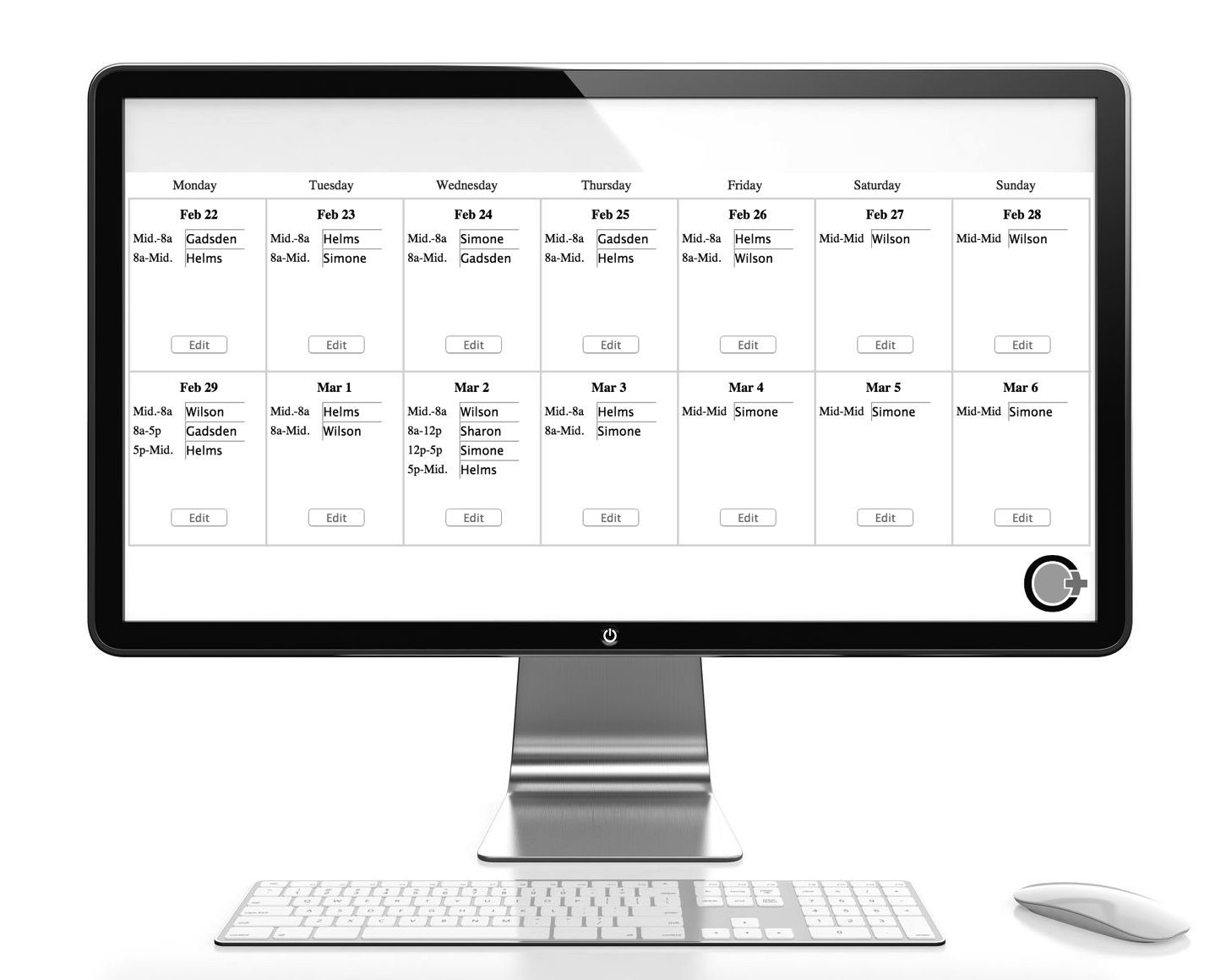
Your practice’s on-call schedule is available online, where you can easily access it via a user/password login. The flexible shifts allow you to set up to 5 shifts per day, or you can keep it simple with just one. You can program your schedule weeks or months in advance.
Customizable Call Flow
The call script used to answer your calls is completely customizable, everything from the initial greeting the caller hears, to voice mail options and beyond. We pride ourselves on making sure our system works for your specific call answering needs, whether simple or complex. You tell us what you want changed, and we make it happen.
Fits Any Size Practice
Our service fits any size medical group, anything from a single-doctor medical practice up to dozens of doctors. You add each doctor in your group into our online Practice Configurator software; once added, they are eligible to be inserted into shifts in your online call schedule. Plus, we don’t charge extra for additional providers.
Rock Solid Reliability
We consider reliability and consistency as the number one priorities here. Our system runs on a platform employing multiple redundant geographically-dispersed servers and network operation centers…which is a fancy way of saying: Its always ready to answer your calls, every minute of every day, 24/7/365.
An example on-call calendar screen
A word from our users…
FAQ's

Whats the pricing?
No setup or startup fees, whatsoever. And your first month is completely free.
Is there a long term contract?
What devices does this work with?
Is this quick and easy to set up?
How do we get our calls to your service?
What about multiple departments / sub-specialties / other categories?
What about 'non-urgent' messages?
What specifically happens when our call is answered by your service?
The below call-flow is only a typical example; please keep in mind that your call script is flexible and customizable.
When our service answers your call, a custom greeting is played to the caller in a female voice. For example: “You’ve reached the answering service for Riverside Internal Medicine. If this is a critical medical emergency, please hangup and dial 911. If you are a patient or are calling for a patient, press one. If you are a doctor or other medical professional, press two.”
Our system then captures the caller’s Caller ID number, and plays a message such as: “We recognize your number as 843-555-1234. Press 1 to have the doctor return your call at this number. Press 2 to enter a different number.” Usually the caller will just press 1, but they always have the option to enter a different call back number.
Next, the caller is asked whether this is a ‘non-urgent’ message, in which case they can leave a voice mail which will be delivered to the office the next business day. This is a good way to separate the truly urgent calls from the routine “prescription refill” or “appointment change” calls. Urgent calls will of course notify the doctor immediately while non-urgent calls wont.
If voice mail is enabled for the current on-call doctor, our service will take a voice message from the caller. The doctor will then immediately be notified of a new voice message waiting; once the doctor calls in to retrieve the message, he/she can then call back the patient or other caller. If voice mail was not enabled, then our service wont take a voice message but will instead immediately send a text message or page to the doctor, such as: “Please return call to patient at: 843-555-1234”. (So, in summary, using voice mail obviously lets the doctor know what the call is about before calling back the patient, but it does require the extra step of listening to the message. Some doctors want it, some don’t – fortunately, it can easily be configured on a doc-by-doc basis)
Thats about it for a typical call, but again, keep in mind we can script your call flow however you’d like. Want to remove the question about non-urgent calls? No problem. Want to remove the question about “patient caller” vs “professional caller”? No problem. Or perhaps you’d like it to ask the caller if they are a “new patient” vs “existing patient”. Its all doable.
Does this service come with a smartphone App ?
Is your service well supported?
Can I hear what this sounds like before signing up?
Can we use your service as an 'Always On' number?
Can patients (or other callers) send a text message to our number?
Short Video – How to set your Call Schedule
Get Started with a Free Demo
Get started by creating a new practice in our Practice Configurator web portal. It only takes a few minutes. Once you create a new practice, we’ll attach a new toll free number to it, so you can dial in and demo our service. Quick and easy. No obligations. And if you wind up using our service, the first month is on us – no charge.
p: (843) 437 2611 e: info@commoneoncall.com
Comm One OnCall
Mount Pleasant, SC 29464 USA